안타깝게도 Ultimate Member에서 매우 이례적인 수준의 심각한 보안취약점이 나왔습니다.
Ultimate Member 2.6.4 이전 버전에서 Ultimate Member 폼을 이용해 관리자 계정을 생성할 수 있는 매우 치명적인 보안취약점이 발견되었습니다. Ultimate Member에 따르면 해당 취약점은 2.6.5 버전(7월 28일)에서 수정되었으나, 아직 완벽하지 않은 것으로 보입니다. 따라서, 본 취약점은 플러그인 업데이트만으로 해결되지 않습니다. 아래의 대응법을 확인해 주십시오.
“Fixed: A privilege escalation vulnerability used through UM Forms. Known in the wild that vulnerability allowed strangers to create administrator-level WordPress users. Please update immediately and check all administrator-level users on your website.”
– 출처: WordPress.org에 올라온 Ultimate Member 2.6.5 업데이트 공지 내용 –
WordFence에 따르면 2.6.6 버전에서도 해당 취약점이 완전히 해소되지 않아 삭제를 권장하고 있습니다.
“As the latest version of the plugin, 2.6.6, is not fully patched, we recommend uninstalling the plugin until a complete patch has been released.”
– 출처: “PSA: Unpatched Critical Privilege Escalation Vulnerability in Ultimate Member Plugin Being Actively Exploited (WordFence) –
또다른 보안 리포팅 사이트인 WPScan에서도 유사한 리포트가 등록되어 있습니다.
“The plugin does not prevent visitors from creating user accounts with arbitrary capabilities, effectively allowing attackers to create administrator accounts at will. This is actively being exploited in the wild.”
– 출처: Ultimate Member <= 2.6.6 – Unauthenticated Privilege Escalation (WPScan) –
현재 Ultimate Member 팀에서는 2.6.6에서 보안취약점이 부분적으로 해소되었으며, WPScan과 함께 추가 업데이트를 준비 중이라고 합니다.
“We are working on the fixes related to this vulnerability since 2.6.3 version when we get a report from one of our customers. Versions 2.6.4, 2.6.5, 2.6.6 partially close this vulnerability but we are still working together with the WPScan team for getting the best result. We also got their report with all the necessary details.
All previous versions are vulnerable so we highly recommend to upgrade your websites to 2.6.6 and keep updates in the future for getting the recent security and feature enhancements.”
– 출처: Ultimate Member 개발자, Mykyta Synelnikov (출처: WordPress.org) –
당장 대응하는 법
방법 1. Ultimate Member 삭제 또는 비활성화
WordFence, Kinsta에서는 삭제를 권장하고 있습니다. 가장 확실한 방법으로 비활성화해도 무방합니다.
방법 2. 회원가입 비활성화
해당 이슈가 완전히 해결되기 전까지 회원가입 페이지를 일시적으로 비공개합니다.
방법3. Ultimate Member 유지와 대응
회원가입 중단이 어렵다면 아래의 가이드를 따라 보안성을 높입니다.
① Ultimate Member를 최신 버전으로 업데이트합니다.
② 사용자 목록에서 직접 추가하지 않은 관리자가 있는지 확인하고 삭제합니다.
③ 해당 취약점 공격에 사용된 것으로 보이는 도메인과 아이디를 블록합니다.
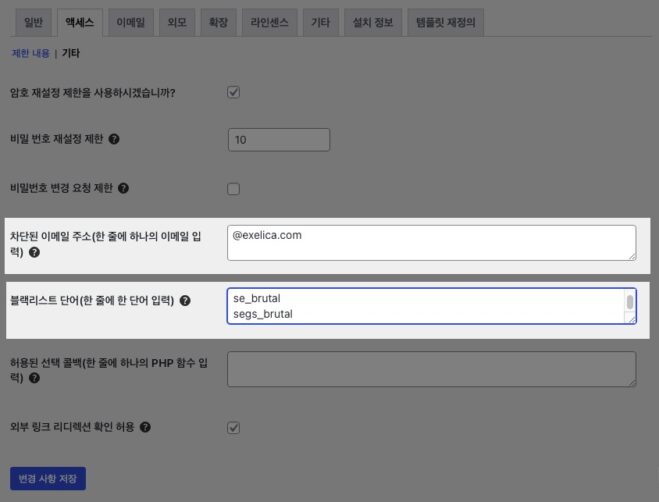
Ultimate Member 설정에서 ‘액세스 > 기타’로 이동해 공격에 사용된 것으로 추정되는 도메인과 아이디를 입력합니다. 해당 정보는 WordFence에서 제공했습니다.
도메인
@exelica.com
블랙리스트 단어
wpenginer
wpadmins
wpengine_backup
se_brutal
segs_brutal
④ 해당 공격에 사용된 것으로 보이는 IP를 차단합니다.
146.70.189.245
103.187.5.128
103.30.11.160
103.30.11.146
172.70.147.176
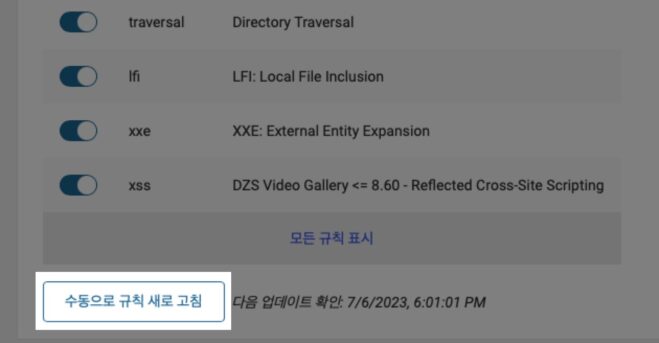
WordFence 유료 사용자의 경우, 자동으로 차단되며 무료 사용자는 WordFence의 모든 옵션 메뉴에서 수동으로 규칙을 업데이트합니다.
추가 안내
Ultimate Member 업데이트 요청을 받으면 곧바로 업데이트하시기 바랍니다. 단비스토어에서도 새로운 업데이트가 있으면 곧바로 뉴스레터로 안내 드리겠습니다.